About Library Management Software
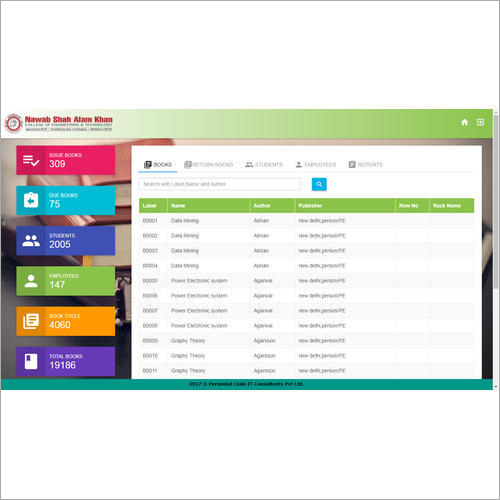
With wide technical knowledge & industry experience, we are involved in offering Library Management Software, that allows users to effectively manage the library process and make the entire process more secure. Our offered software gives the facility of maintaining records like student management, book management, payment management & custom report. Also, Library Management Software is tested for ensuring its excellent performance at users end.
Other Detail:
| Minimum Ram | 2GB |
| Software Version | 1.2 |
| User Friendly | Yes |
| Application | School, Collage |
Efficient School Library ManagementManage your school library processes effortlessly with this desktop application. The software streamlines book tracking, borrowing, and returns, supporting barcode integration for faster operations. Designed specifically for Windows systems, it offers a secure, password-protected environment and automatic backup, protecting your valuable library data with reliable database support.
Customizable Features for Unique NeedsTailor library management to your institutions requirements using the softwares flexible customization options. Generate detailed reports for inventory and circulation, ensuring comprehensive oversight. With manual update control, administrators retain full authority over the deployment process. The intuitive interface keeps management efficient, even for first-time users.
FAQs of Library Management Software:
Q: How does the automatic backup feature work in this Library Management Software?
A: The software automatically creates regular backups of library data stored on your system, safeguarding information against accidental loss or system failures. No manual intervention is needed; backups are managed on-premise within your Windows environment.
Q: What is the process for integrating barcodes with the library database?
A: Barcode integration is supported directly with the MS Access database. Each book must be assigned a barcode, which the software then links to its record, simplifying issue and return activities and minimizing human error during tracking.
Q: Where can this Library Management Software be deployed?
A: This software is intended for on-premise deployment, specifically on Windows-based desktop systems used in school libraries within India. It is not designed for cloud hosting or mobile applications.
Q: When should software updates be applied and how are they performed?
A: Updates are done manually by the library administrator or IT staff when released by the provider. Youll need to download update files and install them on your Windows desktop, ensuring continued security and feature enhancements.
Q: What security measures are available to protect sensitive library information?
A: The application is password protected, restricting access to authorized personnel only. This ensures that sensitive information remains secure and administrators control who can manage library records.
Q: Who benefits most from using this Library Management Software?
A: Single users or administrators overseeing school libraries in India will benefit most. The application provides efficient cataloging, reporting, and tracking functionalities tailored to educational environments.

 Send Inquiry


 Send Inquiry

 Send Inquiry
